








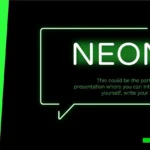







When it comes to capturing an audience's attention, nothing beats a Neon Green PowerPoint template. This type of design combines the visual impact of the color with a modern aesthetic, ideal for those seeking presentations that stand out for their energy, creativity, and professionalism.
Throughout my projects, I've found that this type of template is not only visually appealing but also highly functional. It offers a wide variety of resources such as timelines, images, vectors, charts, maps, and more, which you can use to better organize your content, allowing you to structure information clearly without sacrificing visual impact. Features
A design that illuminates your ideas
Neon green has a special quality: it conveys innovation and dynamism. In a presentation, that particular brightness translates into energy, modernity, and confidence. This template takes full advantage of that potential through backgrounds with balanced contrasts, legible typography, and well-distributed graphic elements.
During my testing of this design, I realized that the included vectors and boxes make it easy to create clear and organized sections. This versatility allows you to adapt it to corporate projects as well as educational or creative topics.
Editable resources that enhance your message
One of the most useful features of the Neon Green PowerPoint template is its editable structure. You can change colors, adjust text, insert your own images, and rearrange elements to reflect your personal style or your brand's visual identity.
In my presentations, I often use maps and timelines to visually illustrate important processes or milestones. This customization option makes each slide unique without sacrificing aesthetic consistency. And thanks to the neon color palette, everything looks more modern and professional.
Ideal for modern and colorful presentations
This template is perfect for those who want to break the monotony of traditional slides. Its bright green aesthetic, combined with dark or neutral backgrounds, creates a striking contrast that grabs attention from the very first slide.
Furthermore, it includes different types of charts, allowing you to transform complex data into clear visualizations. Personally, I've found it very practical for organizing visual content and highlighting key ideas without cluttering the design.
Versatility for different uses
Whether you use it for a professional report, an educational project, or a creative presentation, its design adapts to any context. The Neon Green PowerPoint template offers a balance between elegance and visual energy, something few templates achieve.
In my experience, I've noticed that incorporating elements like informational charts and colorful vectors helps maintain the audience's attention. And that detail—which seems simple—makes a big difference in the final result.
Main features of the template
- Vibrant and bright colors like neon green.
- 36 fully editable slides.
- Compatible with PowerPoint and Google Slides.
- Pre-designed layouts for data, processes, and maps.
- Seamless integration with images and vectors.
- Professional format, ideal for any type of audience.




